Amazon CloudWatch is a monitoring and observability service designed to help collect, analyze, and act on data from applications, infrastructure, and services running in AWS and on-premises environments.
You can export telemetry data from your s with the real-time analytics capability enabled to Amazon CloudWatch. The available metrics include CPU usage, RAM usage, and storage. This integration is available for Scale and Enterprise pricing tiers.
This page explains how to export telemetry data from your into CloudWatch by creating a data exporter, then attaching it to the .
Prerequisites
To follow the steps on this page:
-
Create a target with the Real-time analytics capability enabled.
You need your connection details.
This feature is currently not supported for on Microsoft Azure.
Create a data exporter
A data exporter sends telemetry data from a to a third-party monitoring
tool. You create an exporter on the project level, in the same AWS region as your :
-
In , open Exporters
-
Click
New exporter
-
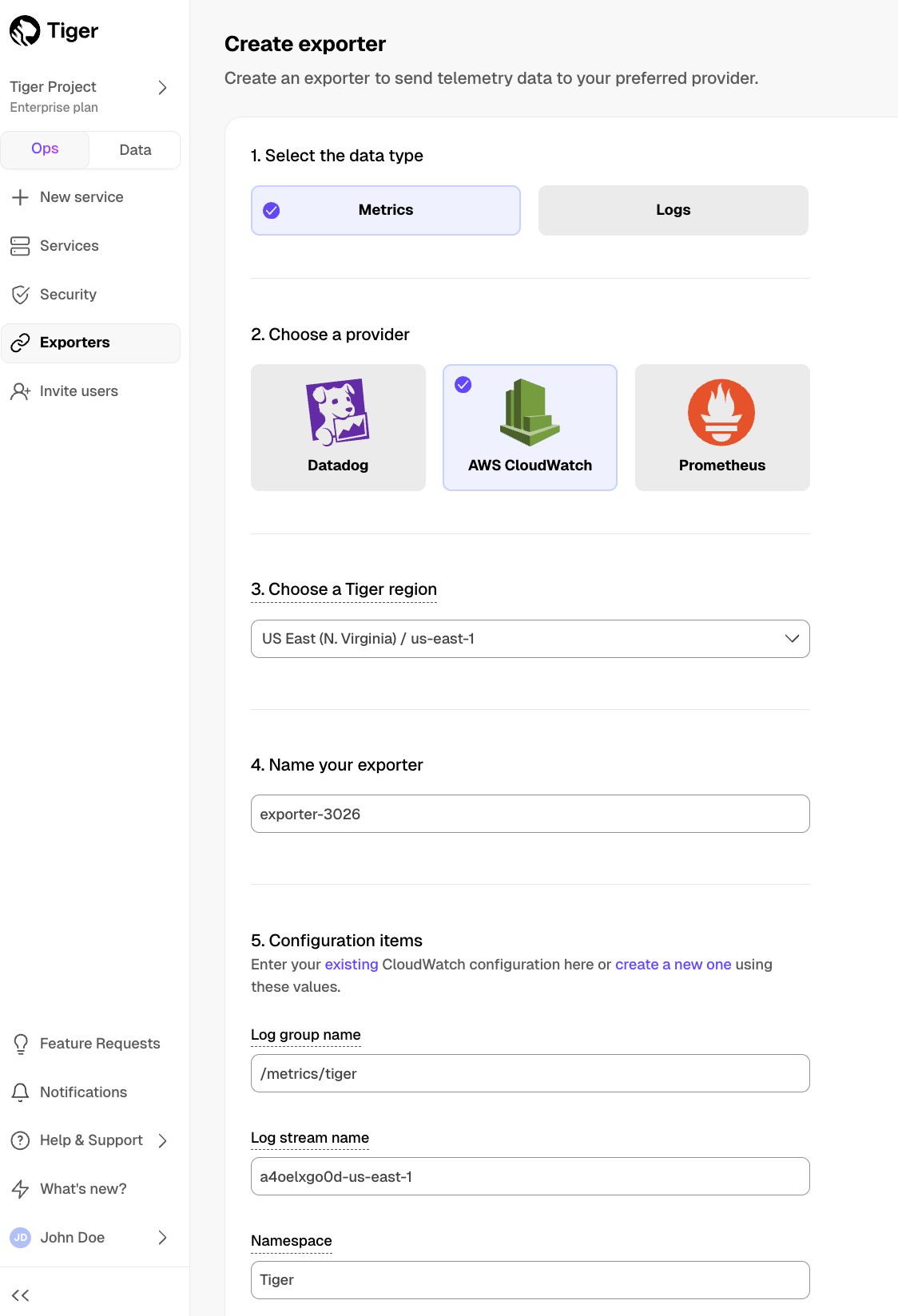
Select the data type and specify
AWS CloudWatch for provider
-
Provide your AWS CloudWatch configuration
-
Choose the authentication method to use for the exporter
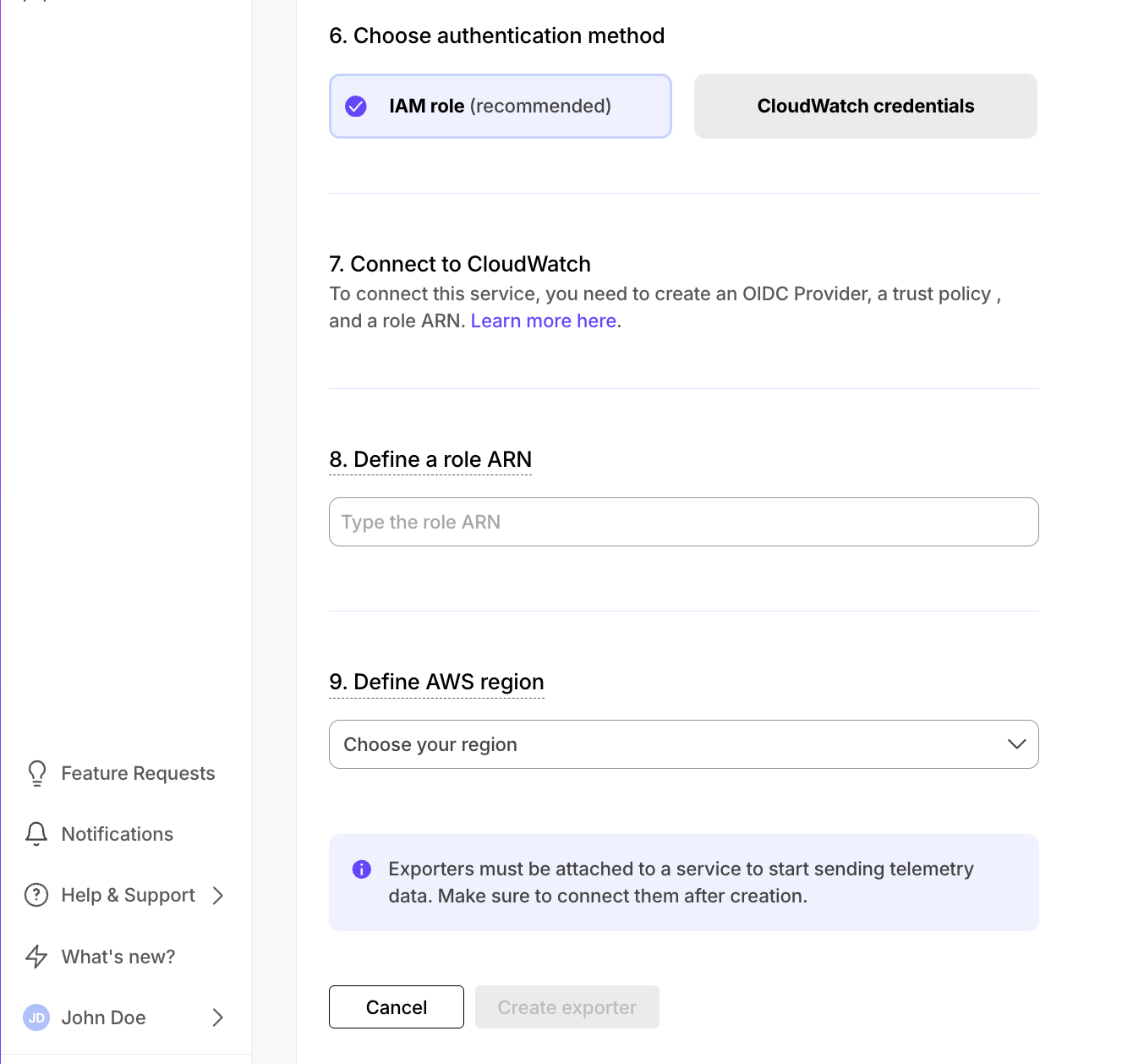
IAM role
CloudWatch credentials
-
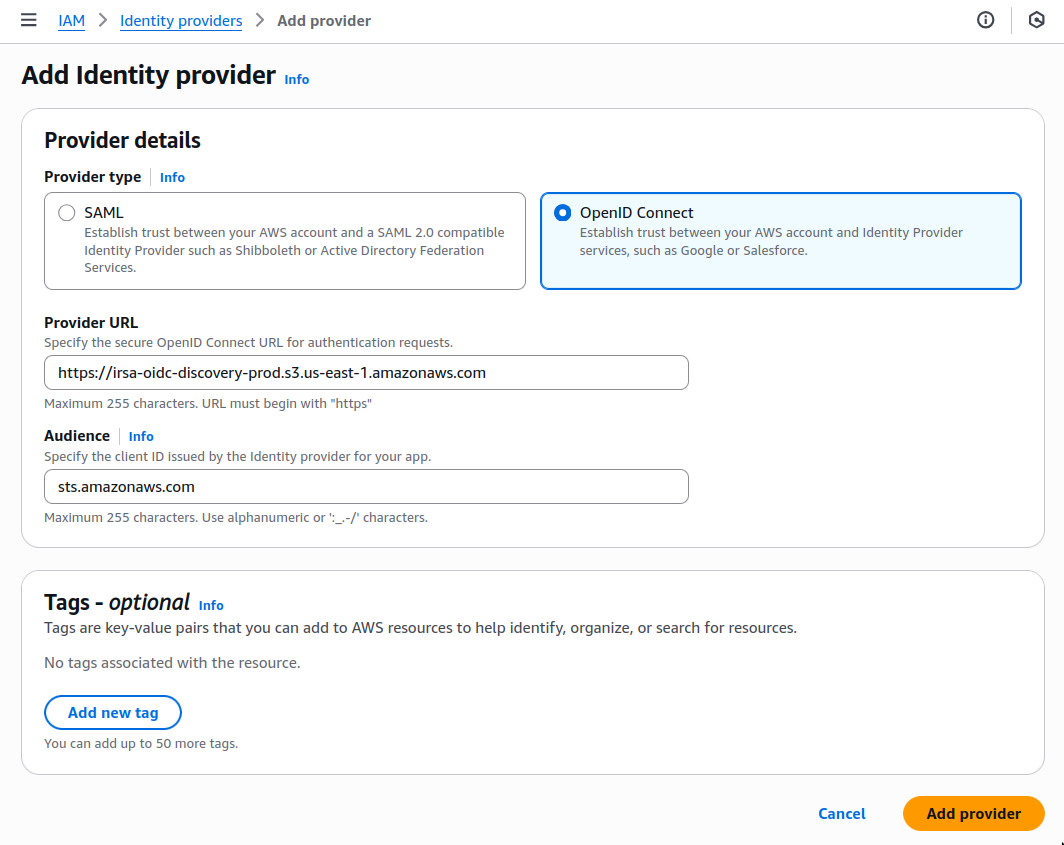
In AWS, navigate to IAM > Identity providers, then click
Add provider.
-
Update the new identity provider with your details:
Set
Provider URL to the region where you are creating your exporter.
-
Click
Add provider.
-
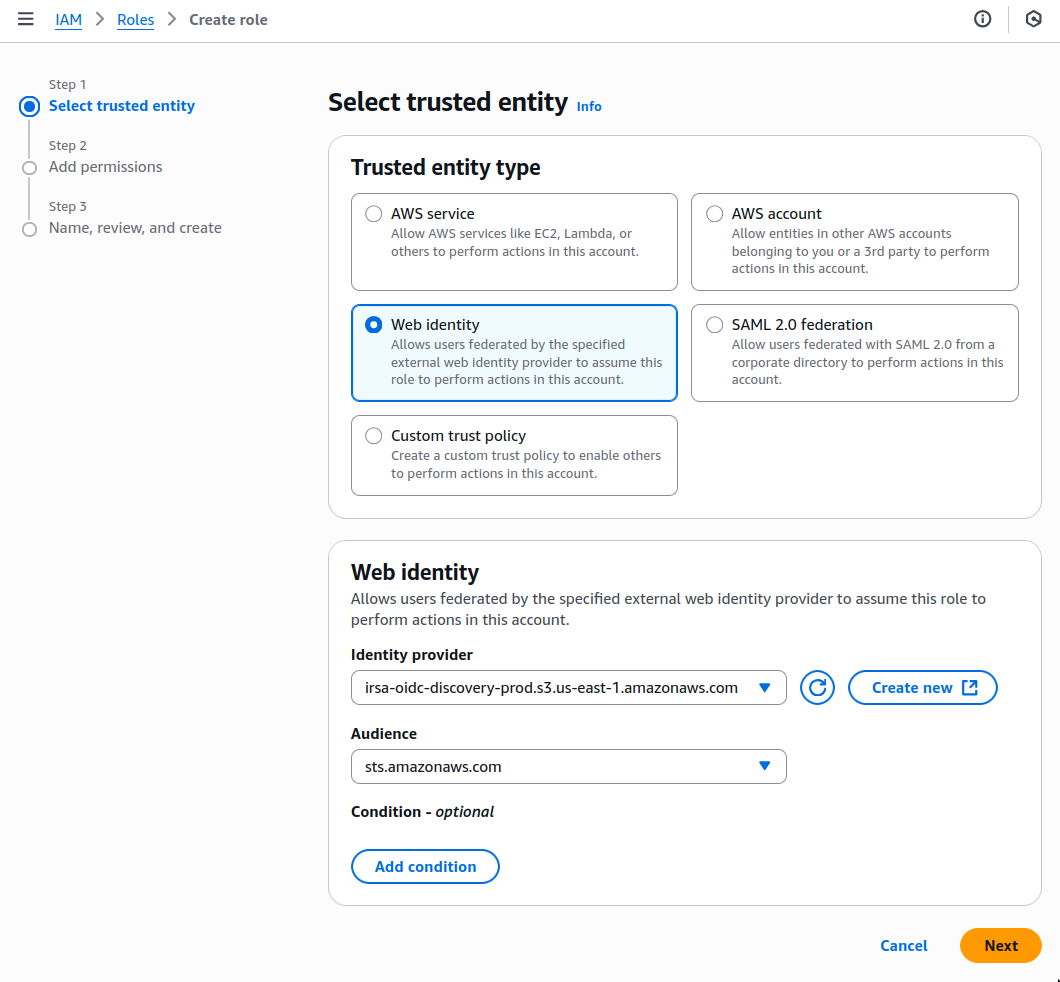
In AWS, navigate to IAM > Roles, then click
Create role.
-
Add your identity provider as a Web identity role and click
Next.
-
Set the following permission and trust policies:
-
Permission policy:
{
  "Version": "2012-10-17",
  "Statement": [
     {
         "Effect": "Allow",
         "Action": [
             "logs:PutLogEvents",
             "logs:CreateLogGroup",
             "logs:CreateLogStream",
             "logs:DescribeLogStreams",
             "logs:DescribeLogGroups",
             "logs:PutRetentionPolicy",
             "xray:PutTraceSegments",
             "xray:PutTelemetryRecords",
             "xray:GetSamplingRules",
             "xray:GetSamplingTargets",
             "xray:GetSamplingStatisticSummaries",
             "ssm:GetParameters"
         ],
         "Resource": "*"
     }
 ]
}
-
Role with a Trust Policy:
{
  "Version": "2012-10-17",
  "Statement": [
      {
          "Effect": "Allow",
          "Principal": {
              "Federated": "arn:aws:iam::12345678910:oidc-provider/irsa-oidc-discovery-prod.s3.us-east-1.amazonaws.com"
          },
          "Action": "sts:AssumeRoleWithWebIdentity",
          "Condition": {
              "StringEquals": {
                  "irsa-oidc-discovery-prod.s3.us-east-1.amazonaws.com:aud": "sts.amazonaws.com"
              }
          }
      },
      {
          "Sid": "Statement1",
          "Effect": "Allow",
          "Principal": {
              "AWS": "arn:aws:iam::12345678910:role/my-exporter-role"
          },
          "Action": "sts:AssumeRole"
      }
  ]
}
- Click
Add role.
-
Select the AWS Region your CloudWatch services run in, then click
Create exporter.
Attach a data exporter to a Tiger Cloud service
To send telemetry data to an external monitoring tool, you attach a data exporter to your
. You can attach only one exporter to a .
To attach an exporter:
- In , choose the
- Click
Operations > Exporters
- Select the exporter, then click
Attach exporter
- If you are attaching a first
Logs data type exporter, restart the
Monitor Tiger Cloud service metrics
You can now monitor your metrics. Use the following metrics to check the service is running correctly:
timescale.cloud.system.cpu.usage.millicorestimescale.cloud.system.cpu.total.millicorestimescale.cloud.system.memory.usage.bytestimescale.cloud.system.memory.total.bytestimescale.cloud.system.disk.usage.bytestimescale.cloud.system.disk.total.bytes
Additionally, use the following tags to filter your results.
| Tag | Example variable | Description |
|---|
host | us-east-1.timescale.cloud | |
project-id | | |
service-id | | |
region | us-east-1 | AWS region |
role | replica or primary | For with replicas |
node-id | | For multi-node services |
Edit a data exporter
To update a data exporter:
- In , open Exporters
- Next to the exporter you want to edit, click the menu >
Edit
- Edit the exporter fields and save your changes
You cannot change fields such as the provider or the AWS region.
Delete a data exporter
To remove a data exporter that you no longer need:
-
Disconnect the data exporter from your Tiger Cloud services
- In , choose the .
- Click
Operations > Exporters.
- Click the trash can icon.
- Repeat for every attached to the exporter you want to remove.
The data exporter is now unattached from all s. However, it still exists in your project.
-
Delete the exporter on the project level
- In , open Exporters
- Next to the exporter you want to edit, click menu >
Delete
- Confirm that you want to delete the data exporter.
Reference
When you create the IAM OIDC provider, the URL must match the region you create the exporter in.
It must be one of the following:
| Region | Zone | Location | URL |
|---|
ap-southeast-1 | Asia Pacific | Singapore | irsa-oidc-discovery-prod-ap-southeast-1.s3.ap-southeast-1.amazonaws.com |
ap-southeast-2 | Asia Pacific | Sydney | irsa-oidc-discovery-prod-ap-southeast-2.s3.ap-southeast-2.amazonaws.com |
ap-northeast-1 | Asia Pacific | Tokyo | irsa-oidc-discovery-prod-ap-northeast-1.s3.ap-northeast-1.amazonaws.com |
ca-central-1 | Canada | Central | irsa-oidc-discovery-prod-ca-central-1.s3.ca-central-1.amazonaws.com |
eu-central-1 | Europe | Frankfurt | irsa-oidc-discovery-prod-eu-central-1.s3.eu-central-1.amazonaws.com |
eu-west-1 | Europe | Ireland | irsa-oidc-discovery-prod-eu-west-1.s3.eu-west-1.amazonaws.com |
eu-west-2 | Europe | London | irsa-oidc-discovery-prod-eu-west-2.s3.eu-west-2.amazonaws.com |
sa-east-1 | South America | São Paulo | irsa-oidc-discovery-prod-sa-east-1.s3.sa-east-1.amazonaws.com |
us-east-1 | United States | North Virginia | irsa-oidc-discovery-prod.s3.us-east-1.amazonaws.com |
us-east-2 | United States | Ohio | irsa-oidc-discovery-prod-us-east-2.s3.us-east-2.amazonaws.com |
us-west-2 | United States | Oregon | irsa-oidc-discovery-prod-us-west-2.s3.us-west-2.amazonaws.com |

