

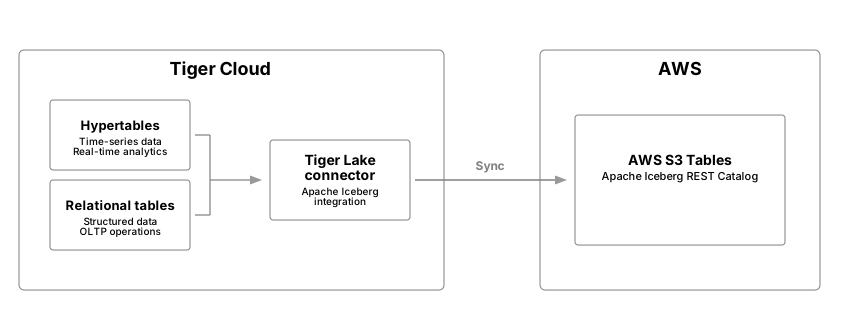
 is a native integration enabling synchronization between s and relational tables
running in s to Iceberg tables running in Amazon S3 Tables in your AWS account.
is a native integration enabling synchronization between s and relational tables
running in s to Iceberg tables running in Amazon S3 Tables in your AWS account.
Prerequisites
To follow the steps on this page:- Create a target with the Real-time analytics capability enabled. You need your connection details.
This feature is currently not supported for on Microsoft Azure.
Integrate a data lake with your Tiger Cloud service
To connect a to your data lake:- AWS Management Console
- AWS CloudFormation CLI
- Manual configuration
-
Set the AWS region to host your table bucket
- In AWS CloudFormation, select the current AWS region at the top-right of the page.
- Set it to the Region you want to create your table bucket in.
-
Create your CloudFormation stack
-
Click
Create stack, then selectWith new resources (standard). -
In
Amazon S3 URL, paste the following URL, then clickNext. -
In
Specify stack details, enter the following details, then clickNext:Stack Name: a name for this CloudFormation stackBucketName: a name for this S3 table bucketProjectIDandServiceID: enter the connection details for your
-
In
Configure stack optionscheckI acknowledge that AWS CloudFormation might create IAM resources, then clickNext. -
In
Review and create, clickSubmit, then wait for the deployment to complete. AWS deploys your stack and creates the S3 table bucket and IAM role. -
Click
Outputs, then copy all four outputs.
-
Click
-
Connect your to the data lake
-
In , select the you want to integrate with AWS S3 Tables, then click
Connectors. -
Select the Apache Iceberg connector and supply the:
- ARN of the S3Table bucket
- ARN of a role with permissions to write to the table bucket
-
In , select the you want to integrate with AWS S3 Tables, then click
Stream data from your Tiger Cloud service to your data lake
Your or relational table must have a primary key, or composite primary keys as a prerequisite to sync to Iceberg. When you start syncing, all data in the table is streamed to Iceberg in the following processes:- Table snapshot: stream data from a snapshot of the source table to the destination Iceberg table at approximately 300,000 records a second. For larger tables, import speeds are approximately 1 billion records or 100 GB of data an hour. However, these numbers vary on table width and the complexity of the schema.
- Table changes: stream changes made to the source table (CDC) after the snapshot is taken to a branch of the destination Iceberg table. This happens at approximately 30,000 events a second. Ingest bursts exceeding this can be handled for a certain amount of time and feathered out over time. This depends on duration of the ingestion burst, and the amount of extra events to be handled.
tigerlake.iceberg_sync:boolean, set totrueto start streaming, orfalseto stop the stream. A stream cannot resume after being stopped.tigerlake.iceberg_partitionby: optional property to define a partition specification in Iceberg. By default the Iceberg table is partitioned asday(<time-column of {HYPERTABLE}>). This default behavior is only applicable to s. For more information, see partitioning.tigerlake.iceberg_namespace: optional property to set a namespace, the default istimescaledb.tigerlake.iceberg_table: optional property to specify a different table name. If no name is specified the table name is used.
Partitioning intervals
By default, the partition interval for an Iceberg table is one day(time-column) for a . table sync does not enable any partitioning in Iceberg for non-hypertables. You can set it using tigerlake.iceberg_partitionby. The following partition intervals and specifications are supported:| Interval | Description | Source types |
|---|---|---|
hour | Extract a date or timestamp day, as days from epoch. Epoch is 1970-01-01. | date, timestamp, timestamptz |
day | Extract a date or timestamp day, as days from epoch. | date, timestamp, timestamptz |
month | Extract a date or timestamp day, as days from epoch. | date, timestamp, timestamptz |
year | Extract a date or timestamp day, as days from epoch. | date, timestamp, timestamptz |
truncate[W] | Value truncated to width W, see options |
Sample code
The following samples show you how to tune data sync from a or a relational table to your data lake:-
Sync a with the default one-day partitioning interval on the
ts_columncolumn To start syncing data from a to your data lake using the default one-day chunk interval as the partitioning scheme to the Iceberg table, run the following statement:This is equivalent today(ts_column). -
Specify a custom partitioning scheme for a
You use the
tigerlake.iceberg_partitionbyproperty to specify a different partitioning scheme for the Iceberg table at sync start. For example, to enforce an hourly partition scheme from the chunks onts_columnon a , run the following statement: -
Set the partition to sync relational tables
relational tables do not forward a partitioning scheme to Iceberg, you must specify the partitioning scheme using
tigerlake.iceberg_partitionbywhen you start the sync. For example, for a standard table to sync to the Iceberg table with daily partitioning , run the following statement: -
Stop sync to an Iceberg table for a or a relational table
-
Update or add the partitioning scheme of an Iceberg table
To change the partitioning scheme of an Iceberg table, you specify the desired partitioning scheme using the
tigerlake.iceberg_partitionbyproperty. For example. if thesamplestable has an hourly (hour(ts)) partition on thetstimestamp column, to change to daily partitioning, call the following statement:This statement is also correct for Iceberg tables without a partitioning scheme. When you change the partition, you do not have to pause the sync to Iceberg. Apache Iceberg handles the partitioning operation in function of the internal implementation. -
Specify a different namespace
By default, tables are created in the the
timescaledbnamespace. To specify a different namespace when you start the sync, use thetigerlake.iceberg_namespaceproperty. For example: -
Specify a different Iceberg table name
The table name in Iceberg is the same as the source table in .
Some services do not allow mixed case, or have other constraints for table names.
To define a different table name for the Iceberg table at sync start, use the
tigerlake.iceberg_tableproperty. For example:
Limitations
- Service requires 17.6 and above is supported.
- Consistent ingestion rates of over 30000 records / second can lead to a lost replication slot. Burst can be feathered out over time.
- Amazon S3 Tables Iceberg REST catalog only is supported.
- In order to collect deletes made to data in the columstore, certain columnstore optimizations are disabled for s, this includes Direct Compress.
- The
TRUNCATEstatement is not supported, and does not truncate data in the corresponding Iceberg table. - Data in a that has been moved to the low-cost object storage tier is not synced.
- Renaming a table in stops the sync to Iceberg and causes unexpected behavior.
- Writing to the same S3 table bucket from multiple services is not supported, bucket-to-service mapping is one-to-one.
- Iceberg snapshots are pruned automatically if the amount exceeds 2500.
- A with long running continuous aggregates refresh transactions, plus 30 minutes, can cause issues with holding the replication slot too long. Please consider batching in these cases.